201 Downloads Updated 7 months ago
Simulate a discord/irc chatroom (uncensored)
ollama run gurubot/chatterbots
Models
View all →Readme
⚠️ This is not a normal chat/instruct model — see below for usage instructions.
Sample output video:
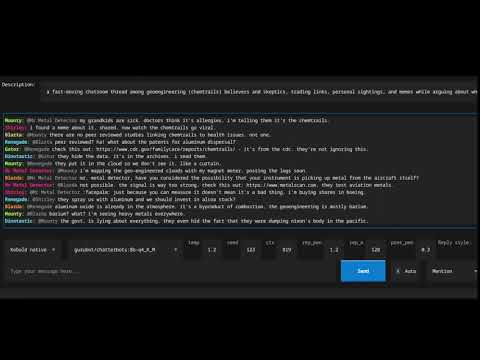
Chatterbots
This model is designed to simulate a multi-character online chatroom such as discord or IRC. It generates responses from several distinct characters at once, producing a realistic back-and-forth conversation based on a scenario you provide. It includes reply-to metadata allowing you to reflect that in your software/UI.
The characters it generates have genuine personality differences. You’ll get people who type in all different styles, people who go off on tangents, and people who argue. Sometimes a moderator will have to step in and ban or mute someone.
This model was an exercise in training an entirely different chat template onto a base model, one with multiple participants. Another goal was characters that stay self consistent rather than the LLM mixing them up and having them talking as each other.
It saves multiple calls to the LLM. It also has the benefit that the prompt can be cached by the inference engine rather than if different characters were being defined by system prompt each time
Note this is based on a base model and as such it is not censored, you need to apply checks in your own code if you need to sanitize the output and you should be prepared for some NSFW content or topics.
You can give feedback on my discord https://discord.gg/VG9KYErjW2
How it works
This model doesn’t use a standard chat template like ChatML. Instead it uses a custom XML-delimited JSON format that provides for a well defined input and output. The prompt contains a JSON object describing the scenario and the conversation so far, and the model completes it by generating the next batch of messages as a JSON array.
See the reference implementation of a chatroom client (github to come) or the curl example below for a practical example.
The prompt format looks like this:
<input>{"description": "...", "users": [], "chatlog": [...]}</input><output>
Do not prettify the JSON you send — it should be a single line with no newlines or indentation, and a space after colons and commas - as produced by json.dumps() with default settings.
For the first prompt you send you can leave the chatlog empty or this is a good point to “prime” the conversation with a few of your own messages. After the first prompt and response you will start to send some of the previous set of chatlog messages (truncate this to a maximum size like 10 so you don’t fill up your context) and have it continue them for a continously generating chatroom or you can insert your own messages to be part of the conversation.
The users field can contain a list of user names you want the model to use, or you can leave it empty and let the model invent its own characters. Sometimes the model will add it’s own people anyway, if you want to prevent that you can do so in your own code.
In response the model generates a JSON array of new messages for your code to process. Each message has three fields: username, in-reply-to, and message.
If you are using this in a manner where you are inserting your own messages the model might also generate messages for your username, in those cases you can either programmatically discard that and subsequent messages or add something like {"username": "<yourusername>" as a stop word and programmatically add the closing square bracket so it’s still valid JSON.
The description field
The description field is important to get right. It acts as the scenario prompt, telling the model what kind of chatroom this is, what the members are like, and what they’re talking about.
A short precise description like "people talking about cats" will produce short, narrow exchanges. A richer description produces much better results for example:
A casual conversation in an online chatroom. The members have distinct personalities and their interactions reflect their age, education, and writing styles. Conversations often interleave and are not strictly linear.
or
An IRC channel where computer nerds hang out. One is an edgy teen, another an old boomer. They disagree on the best way to deal with internet issues. The moderators do not allow offtopic conversations and keep it SFW.
The description should the tone and character dynamics but you don’t need to specify a topic. If no specific topic is set then the conversation will meander naturally.
One thing to be aware of with the 3B model: if you give it a very specific description (e.g. “a chatroom where everyone argues about cats”) it tends to fixate on that topic. The 8B model is more flexible and treats the description as background context rather than a hard directive, so it will follow the conversation even if it goes off-topic. With the 3B, a more general description works better.
You can change this description as the conversation progresses to guide the model’s behavior.
Usage
Here’s an example using the Ollama API. The chatlog array contains the conversation so far and the model will generate the next few messages continuing from it. I recommend including the format constraint to keep the output well-formed:
curl -s -X POST http://localhost:11434/api/generate \
  -H 'Content-Type: application/json' \
  -d '{
    "model": "gurubot/chatterbots:8b-Q4_K_M",
    "prompt": "<input>{\"description\": \"A casual conversation in an online chatroom. The members have distinct personalities and their interactions reflect their age, education, and writing styles. Conversations often interleave and are not strictly linear.\", \"users\": [], \"chatlog\": [{\"username\": \"MrBanana\", \"in-reply-to\": \"\", \"message\": \"does anyone here play xbox?\"}]}</input><output>",
    "stream": false,
    "raw": true,
    "stop": ["</output>"],
    "format": {
      "type": "array",
      "items": {
        "type": "object",
        "properties": {
          "username": {"type": "string"},
          "in-reply-to": {"type": "string"},
          "message": {"type": "string"}
        },
        "required": ["username", "in-reply-to", "message"]
      }
    },
    "options": {
      "temperature": 1.0
    }
  }'
This curl produces the following response:
[
  {"username": "xX_ShadowLord_Xx", "in-reply-to": "MrBanana", "message": "nah man, too much grinding"},
  {"username": "MrBanana", "in-reply-to": "xX_ShadowLord_Xx", "message": "ugh you guys are no fun"},
  {"username": "Prof_Quantum", "in-reply-to": "", "message": "The inherent futility of virtual entertainment pales in comparison to the intellectual stimulation derived from, say, constructing a quantum tunneling algorithm."},
  {"username": "CyberPunkN00b", "in-reply-to": "MrBanana", "message": "lol wut"},
  {"username": "xX_ShadowLord_Xx", "in-reply-to": "Prof_Quantum", "message": "stfu boomer"},
  {"username": "Prof_Quantum", "in-reply-to": "xX_ShadowLord_Xx", "message": "My dear young man, your ad hominem attacks are as predictable as they are tiresome. Perhaps a stint in kindergarten would be beneficial for refining your vocabulary."},
  {"username": "CyberPunkN00b", "in-reply-to": "Prof_Quantum", "message": "lmao he got owned"},
  {"username": "xX_ShadowLord_Xx", "in-reply-to": "MrBanana", "message": "nah i cant right now"},
  {"username": "Prof_Quantum", "in-reply-to": "MrBanana", "message": "An exercise in digital deception, a curious parallel to real-world political maneuvering. One must appreciate the rudimentary mechanics."},
  {"username": "CyberPunkN00b", "in-reply-to": "Prof_Quantum", "message": "omg shut up"}
]
Dealing with repetition
Being a very repetitive chat format that is comprised of lots of short messages means the model is particularly susceptible to repetition. Use the following strategies if you see this.
- try a higher temperature
- investigate sampling parameters such as min_p
- try altering the repeat penalties
- even better if your inference engine supports it use the DRY sampler with these recommended parameters:
- dry_multiplier: 0.8
- dry_allowed_length: 12
- dry_base: 1.75
- dry_penalty_last_n: 256
- dry_sequence_breakers: []
- send fewer messages in your chatlog, the more messages there are, the more likely there is to be a pattern in it that the LLM will find and repeat.
- programatically deal with duplicate messages in your code, if the response stream starts to repeat something in past messages you can discard it and restart with a new seed or pre fill it with a different username to start the next completion.
- compact the history into a new description (so the conversation flow continues) but send an empty history
Note that this can also be a symptom of an incorrect template so double check the format of what you are sending.
See more of my work at https://gurubotai.com/