Improved performance and model support with GGUF
June 5, 2026
Ollama 0.30 is now available with improved performance and GGUF model compatibility through llama.cpp. This augments Ollama’s MLX engine on Apple silicon, bringing support to more models on a wider range of hardware.
Performance across more GPUs
Faster throughput on NVIDIA hardware
With Ollama 0.30, performance on NVIDIA hardware is now up to 20% faster, leveraging optimizations contributed by the NVIDIA and llama.cpp teams.
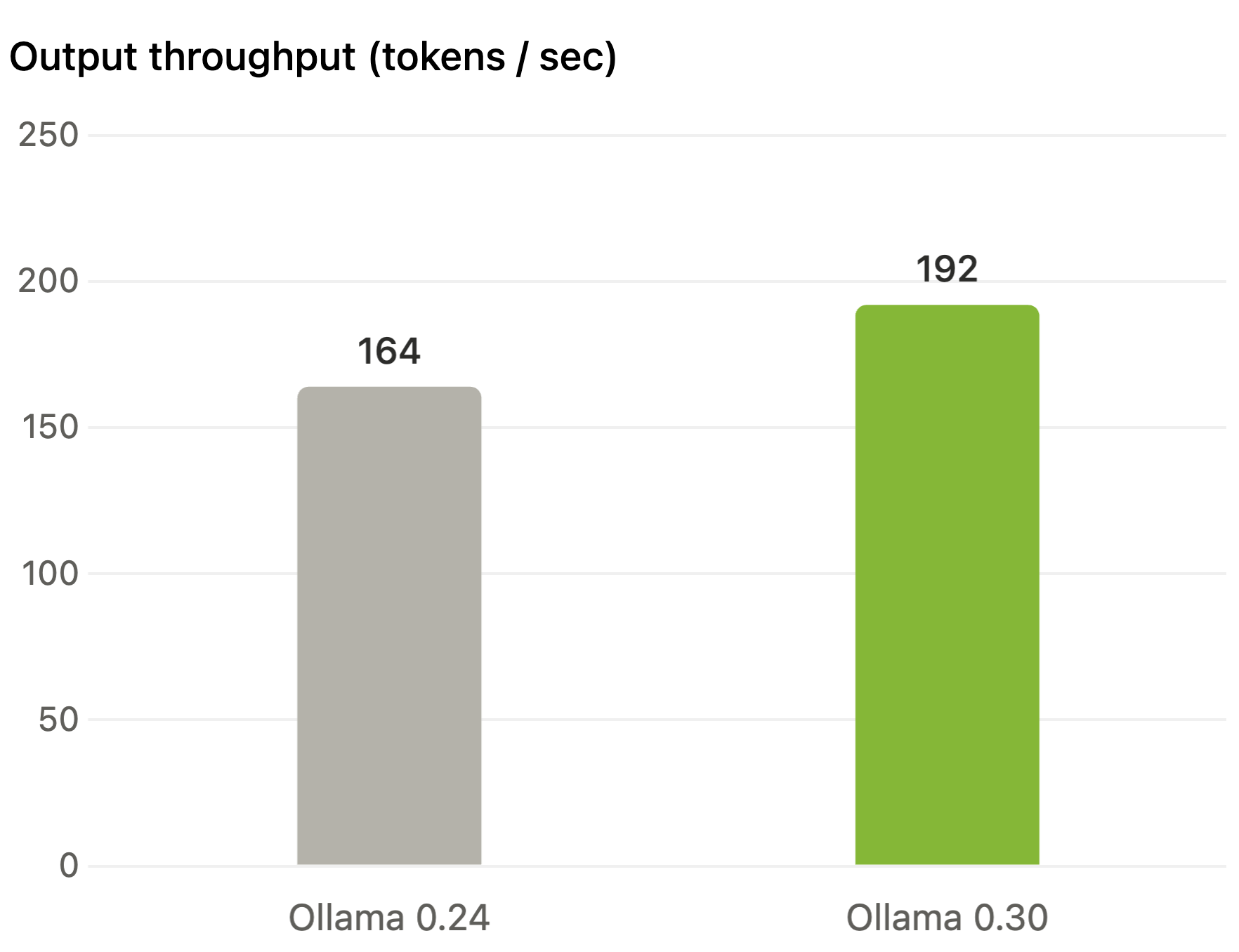
Tested with the Gemma 4 26B model running on an NVIDIA RTX 5090 using the Q4_K_M quantization.
Wider hardware support with Vulkan
Vulkan is now enabled by default, extending Ollama’s GPU acceleration to a wider range of hardware, including AMD and Intel devices. More users can now run models on the GPU out of the box, without installing vendor-specific libraries.
Support for more models
Ollama 0.30 expands compatibility with the GGUF ecosystem, so more models run out of the box—including model families such as LFM and Prism, as well as fine-tuned models published by Unsloth.
Run GGUF models from Hugging Face
To use a model, first download the GGUF file or a directory containing GGUF files. Next, create a Modelfile with the FROM command pointing to the path of the GGUF file (or directory):
FROM ./my-model.Q4_K_M.gguf
Then create and run the model:
ollama create -f Modelfile my-model
ollama run my-model
Coding agents and assistants
If a model supports tool calling, that capability carries over to Ollama. You can use these models with your favorite coding agents and personal assistants in a single command.
Claude Code
ollama launch claude --model my-model
Hermes Agent
ollama launch hermes --model my-model
OpenClaw
ollama launch openclaw --model my-model
To verify that a GGUF file supports tool calling, look for the tools capability with ollama show:
ollama show my-model
Acknowledgements
We’d like to acknowledge the work done by Georgi Gerganov and the llama.cpp maintainer teams, as well as hardware partners including NVIDIA, AMD, Qualcomm, and Intel, who have worked hard to optimize performance with the GGML ecosystem on their respective platforms.
If you have any feedback, join Ollama’s Discord or reach out at hello@ollama.com.